Free Bill of Materials & Inventory Management Software
Compare free bill of materials tools for 2026 on multi-level nesting, cost rollup, CSV import, and live inventory deduction — not marketing checklists. Inventory management software with bill of materials belongs in one system, not two that drift out of sync. Download a template, then start on StockFlow Starter with no credit card. Auto stock deduction needs Professional or higher.
25 products · unlimited BOM lines · multi-level nesting free
01 — How to choose
Five questions before you pick a free BOM tool
The right choice depends on your production setup, not which vendor has the longest feature list. Work through these before you spend a week importing parts into the wrong platform.

Live inventory deduction, or just a parts list?
If you only need a reference document, a spreadsheet or IndaBOM is enough. If completing a production order should reduce component stock and add finished goods, you need an inventory engine — StockFlow with Production, or Katana/inFlow when you go paid.
Will your BOMs nest more than two levels?
A flat list works in almost any tool. Sub-assemblies inside sub-assemblies need multi-level nesting with automatic cost rollup. StockFlow, Odoo, and Katana support unlimited depth; Sheets requires fragile formulas.
Are you comfortable self-hosting?
Odoo Community and IndaBOM are free and powerful but need a server, Docker knowledge, and ongoing maintenance. StockFlow and OpenBOM are cloud SaaS — sign up and build BOMs in minutes.
How many SKUs do you have today?
Under 25 products: StockFlow free Starter covers you. Growing catalogs: StockFlow paid from $9/mo, or inFlow from ~$89/mo. 500+ SKUs with multi-warehouse complexity: Katana or a full ERP like Odoo.
Need BOM, purchasing, and barcode in one place?
Separate tools create reconciliation overhead. StockFlow bundles BOM, purchase orders, and barcode receiving on the same free plan — no integrations required until you need accounting or e-commerce sync.
Quick decision: Cloud + free BOM authoring + barcode, with affordable inventory deduction → StockFlow. Self-hosted + open source + sourcing → IndaBOM or Odoo Community. Ready to pay for MRP UX → Katana. BOM + PO + sales orders at lower cost → inFlow.
Spreadsheet, self-host, or cloud ops
Most teams outgrow a flat sheet once nesting and stock counts matter. Self-host wins when you have IT; cloud wins when you need BOM and inventory live the same week.
- Zero cost, familiar
- No live stock link
- Nesting formulas break
- Odoo / IndaBOM depth
- You own updates & backups
- Weeks to go live for most SMBs
- Multi-level + cost rollup
- Same system as stock counts
- Barcode receiving included
02 — Comparison
Free bill of materials software compared (2026)
Eight realistic options on nesting, auto stock deduction, CSV import, hosting, and paid entry. Free-tier facts verified as of September 2026 — always re-check vendor sites before you commit.
| Platform | Free tier | Multi-level | Auto deduct | CSV import | Hosting | Paid entry |
|---|---|---|---|---|---|---|
| StockFlow | 25 products (Starter) | Unlimited depth | Professional or higher | Yes | Cloud SaaS | From $9/mo |
| IndaBOM | Free (self-host) | Yes | No (native) | Yes | Self-hosted | Hosting cost only |
| Odoo (Community) | Free (self-host) | Yes | Yes (with setup) | Yes | Self-hosted | Hosting + implementation |
| OpenBOM | Limited free tier | Yes | Paid / integration | Yes | Cloud SaaS | Verify on vendor site |
| Katana MRP | Trial only | Yes | Yes | Yes | Cloud SaaS | From ~$179/mo |
| inFlow | Trial only | Yes | Yes | Yes | Cloud + desktop | From ~$89/mo |
| Google Sheets | Free | Manual formulas | No | Manual | Cloud | N/A |
| smallfactory | Free (self-host) | Yes | Partial | Git-native | Self-hosted / cloud | Cloud hosting optional |
Pricing based on public information as of August 2026. Always verify current tiers on vendor sites.
How we evaluated these tools
- Multi-level nesting and cost rollup without manual spreadsheet formulas
- Automatic component stock deduction when a production order completes
- CSV or import path from an existing spreadsheet BOM
- Free-tier caps on products, BOMs, users, and hosting requirements
- Setup time for a small manufacturer with a growing SKU catalog
Cost rollup should not be a spreadsheet chore
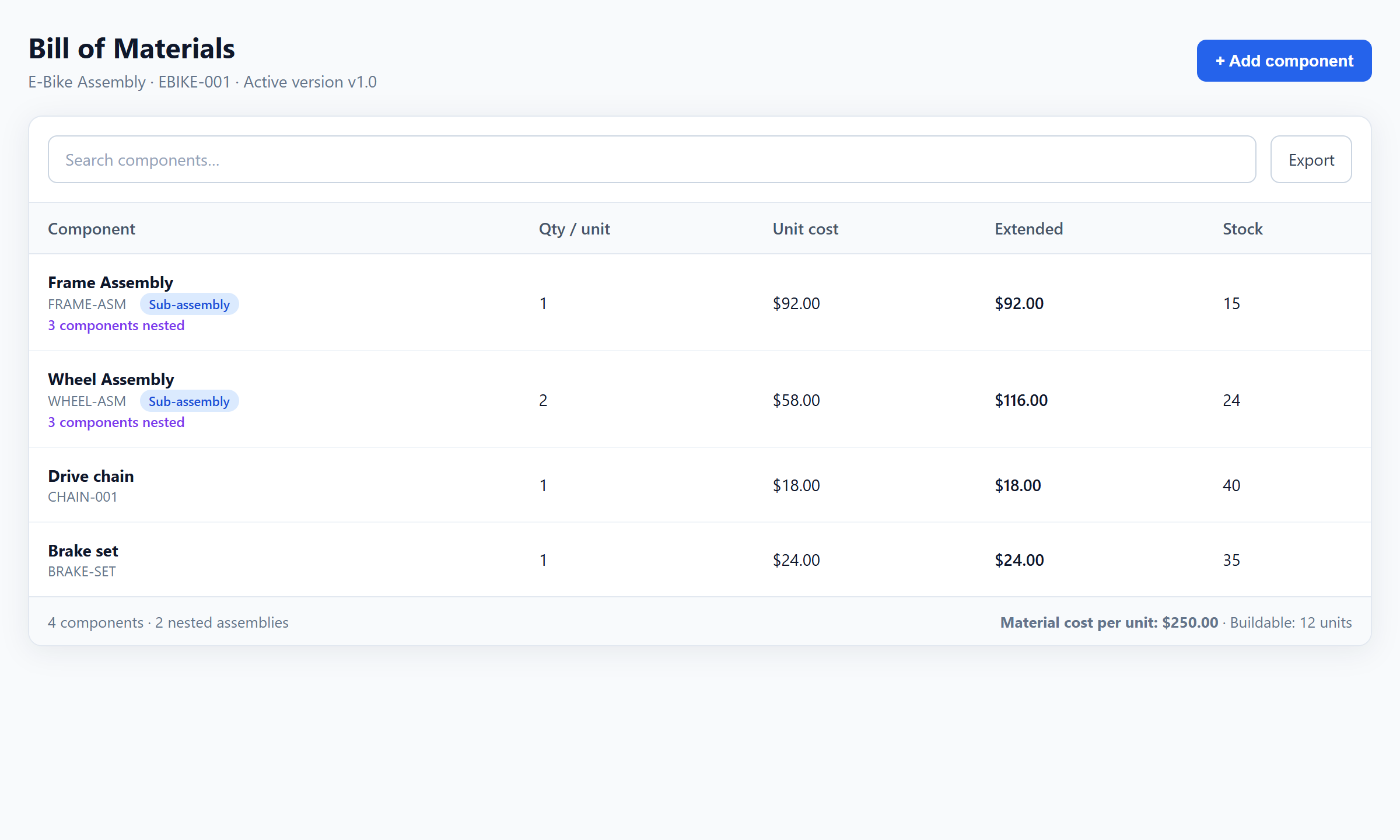
When a Wheel Assembly costs $58 and you use two per E-Bike, the finished-good material cost should update when rim prices change — not after you hunt broken formulas.
- Qty × unit cost × (1 + scrap%) per line
- Sub-assembly totals roll into parents
- Free on StockFlow every plan
03 — Top picks
The 7 best BOM software picks for 2026
Ranked by nesting depth, live inventory deduction, free-tier practicality, and setup effort. We call out paid-only tools honestly when they win on MRP — even when StockFlow ranks first for most free-plan shops.
StockFlow
Best for: Small manufacturers who want BOM authoring + inventory + barcode scanning free, with an affordable path to automatic production deduction
A cloud inventory platform with free multi-level BOM authoring and cost rollup built in, plus an affordable add-on path to automatic production stock deduction.
Free tier: 25 products, 1 user, 1 warehouse (Starter, free). Up to 3 BOMs with unlimited lines each. No credit card required. Unlimited BOMs and automatic stock deduction on build completion are included on Professional and above.
BOM verdict: Multi-level nesting, cost rollup, CSV import, and barcode receiving are free. Automatic stock deduction on production completion requires Professional+ or the Production add-on.
Pros
- Multi-level BOM authoring and cost rollup free on Starter, no credit card
- Unlimited BOM nesting depth on free plan
- Barcode scanning + BOM on the same platform
Limitations
- Automatic stock deduction on build completion is not on the free Starter plan — needs Professional or higher
- Free tier capped at 25 products and 1 warehouse
- No advanced MRP scheduling on free plan
IndaBOM
Best for: Hardware teams comfortable self-hosting who want BOM + sourcing without ERP complexity
An open-source, self-hosted BOM and sourcing tool built for hardware teams who want part numbering and revision control without ERP overhead.
Free tier: Free and open source (django-bom). Self-host on your server or use IndaBOM hosted options.
BOM verdict: Part numbering, multi-source pricing, revision control. No native live inventory deduction without custom integration.
Pros
- Purpose-built for BOM management and sourcing
- Open source — extend and self-host
Limitations
- Requires technical setup for self-hosting
- No out-of-the-box production stock deduction
Odoo (Community)
Best for: Teams with IT resources who want ERP breadth (accounting, CRM, MRP) alongside BOMs
A free, self-hosted ERP with configurable manufacturing BOMs and MRP for teams that have the IT resources to run and maintain it.
Free tier: Free self-hosted Community edition. Odoo Online paid plans from ~$31/user/month (2026).
BOM verdict: Configurable manufacturing BOMs, routings, and MRP. Stock moves on production orders when modules are set up correctly.
Pros
- Broad ERP modules beyond BOM
- Highly configurable manufacturing workflows
Limitations
- Self-hosting and module setup take weeks for most SMBs
- Community edition needs your own hosting and maintenance
OpenBOM
Best for: Engineering teams needing CAD-linked BOM collaboration and change management
A cloud BOM and PLM tool with strong CAD connectors and revision control, best suited to engineering teams rather than shop-floor inventory.
Free tier: Free tier available with limits on BOMs and users — verify on OpenBOM pricing page (2026).
BOM verdict: Excellent revision control and CAD connectors. Inventory deduction requires paid tiers or external ERP integration.
Pros
- Strong CAD and PLM-style revision workflows
- Collaborative BOM editing across teams
Limitations
- Free tier too limited for full production + inventory use
- Live stock deduction not core to the free experience
Google Sheets
Best for: Pre-revenue makers validating a first product with a flat, single-level BOM
A free, familiar starting point for a flat single-level BOM before you need multi-level nesting, cost rollup, or an inventory link.
Free tier: Free with a Google account. No BOM-specific features — you build the structure yourself.
BOM verdict: Manual cost formulas, no live inventory link, no automatic deduction on production.
Pros
- Zero setup cost and universal familiarity
- Easy to share with suppliers and contractors
Limitations
- No multi-level cost rollup without fragile formulas
- Version chaos and no audit trail at scale
Katana MRP
Best for: Small manufacturers ready to pay who need MRP scheduling tightly coupled to BOM and production
A paid, purpose-built MRP platform with multi-level BOMs and automatic stock deduction tightly coupled to production scheduling, no free tier.
Free tier: 14-day trial only, no free tier. Paid plans from ~$179/mo (2026).
BOM verdict: Multi-level BOMs, production orders, automatic stock deduction, variant support. Best-in-class UX among paid MRP tools.
Pros
- Intuitive UI purpose-built for manufacturers
- Strong MRP scheduling alongside BOM and production orders
Limitations
- No free tier — trial only
- Starts at ~$179/mo, expensive for solo or early-stage teams
inFlow
Best for: Small manufacturers who want BOM + PO + sales orders in one tool at a lower price than Katana
A paid BOM, purchasing, and sales-order platform with automatic stock deduction, priced lower than Katana with desktop and cloud options.
Free tier: Trial only, no free tier. Paid from ~$89/mo (2026).
BOM verdict: Multi-level BOMs, production orders, automatic stock deduction. Good barcode support. Desktop + cloud deployment.
Pros
- Lower entry price than Katana MRP
- Desktop + cloud options suit mixed office/shop-floor setups
Limitations
- No free tier
- Less polished MRP scheduling than Katana
04 — Free plan
What StockFlow’s free BOM plan includes
Starter includes 25 products, 1 user, and 1 warehouse with full BOM authoring for up to 3 BOMs — no cap on BOM lines or nesting depth. Unlimited BOMs and automatic stock deduction on production completion are included on Professional and above.
Author multi-level BOMs without a credit card
Nest Frame Assembly and Wheel Assembly under an E-Bike finished good, roll costs, and receive components with barcode — all on the permanently free plan.
- Multi-level bill of materials with unlimited nesting depth free on Starter
- Component cost tracking with automatic finished-good cost rollup free on Starter
- CSV import for products and BOM lines free on Starter
- Barcode scanning to receive components and dispatch finished goods free on Starter
- Low-stock alerts at the component level so you know before you start a build you cannot finish free on Starter
- Multi-level nesting + cost rollup
- CSV import for components & lines
- Barcode receiving on same plan
- Multi-level bill of materials with unlimited nesting depth free on Starter
- Component cost tracking with automatic finished-good cost rollup free on Starter
- CSV import for products and BOM lines free on Starter
- Barcode scanning to receive components and dispatch finished goods free on Starter
- Low-stock alerts at the component level so you know before you start a build you cannot finish free on Starter
- Manually create a purchase order for components you're short on using purchase order management free on Starter
- One warehouse on free Starter; multi-location warehouses on paid plans
- CSV import/export to keep finished-good sales and accounting tools aligned with BOM-driven stock (native channel connectors on the roadmap)
- Live stock deduction when a production order is completed requires Professional or higher, not included on free Starter
See nesting the way the shop floor uses it
The same E-Bike tree from our template — sub-assemblies, quantities, and rolled-up material cost per finished unit.
When you add production deduction
Completing a work order should consume components and add finished goods in one step. On StockFlow that path is Professional or higher — not free Starter.
Build your first multi-level BOM free
StockFlow Starter: 25 products, unlimited BOM lines, cost rollup, and barcode receiving — no credit card.
05 — Template
Free multi-level BOM spreadsheet template
Start with the E-Bike example or replace the rows with your own SKUs. The workbook matches StockFlow’s CSV import columns so you can migrate when sheets stop scaling.
Two sheets, import-ready columns
Import Components first, then attach BOM lines — or map both through CSV. Pre-filled with the three-level E-Bike tree (Frame Assembly and Wheel Assembly).
- Components: SKU, name, UOM, unit cost, opening stock
- BOM_Lines: parent SKU, component SKU, qty per unit, scrap %
- Matches StockFlow CSV import
Deep dive: Excel BOM template vs BOM software
06 — Inventory + BOM
Inventory management software with bill of materials
A standalone BOM tool tracks what a product is made of; it does not know what you have in stock. A standalone inventory tool tracks stock; it does not know a finished-good build should consume five components. Inventory management software with bill of materials belongs in one system so counts never drift apart.
One record for recipe and stock
When the bill of materials lives with your stock counts, a build can deduct every component, fire low-stock alerts on materials (not just finished goods), and roll current prices into a live finished-good cost.
- Component stock visible before you schedule a run
- Low-stock alerts on materials, not only FG
- Cost rolls when supplier prices change
- Knows the recipe
- Does not know stock on hand
- Build → manual deduct
- Component stock visible
- Low-stock before build
- Cost rolls with price changes
This is what bill of materials inventory management is for: linking each finished-good BOM to actual component stock so you can see, before you schedule a run, whether you have enough of every part on hand. That link prevents two opposite failures: a stockout that stalls a production run partway through, and overstocked components tying up cash because no one checked the BOM against real demand first.
07 — Basics
What is a bill of materials?
A BOM is a structured list of every raw material, component, sub-assembly, and quantity required to manufacture one unit of a finished product — the recipe for the dish you sell.
Engineering BOM (EBOM)
Design-intent structure from engineering — part numbers, tolerances, and revision history.
Manufacturing BOM (MBOM)
Production-ready map to purchased parts, sub-assemblies, and shop-floor work instructions.
Sales BOM
Kit or bundle sold as components on the sales order rather than a single finished good.
Service BOM
Spare parts and consumables needed to maintain or repair a product in the field.
For most small manufacturers, the manufacturing BOM matters most day-to-day: if you want to make 50 units, do you have enough components in stock, and what do you need to order?
Why spreadsheet BOMs break down
Sheets are a natural starting point. Problems emerge once nesting, shared edits, and live stock matter — the same four failure modes show up in almost every shop we talk to.
What good free BOM software must do
Not all free tools are equal. Verify multi-level nesting, cost rollup, CSV import, a live inventory link, and honest free-tier caps. Auto deduct on a forever-free plan is rare — StockFlow is clear that it needs Production.
Frequently asked questions
What is the best BOM software in 2026?
StockFlow is the best BOM software for most small manufacturers in 2026. It includes multi-level bills of materials, cost rollup, and barcode scanning on the free Starter plan (25 products, unlimited BOM lines, no credit card). The free Starter plan includes up to 3 bills of materials with cost rollup; unlimited BOMs and automatic stock deduction when a production order completes (the Production module) are included on Professional and above.
Is there free bill of materials management software?
Yes. StockFlow offers free bill of materials management software on its permanent Starter plan (25 products, unlimited BOM lines per product, no credit card required). It supports multi-level BOMs and cost rollup free on every plan. The free Starter plan includes up to 3 bills of materials with cost rollup; unlimited BOMs and automatic stock deduction when a production order completes (the Production module) are included on Professional and above.
What is the best free bill of materials software?
StockFlow is the best free bill of materials software for small manufacturers. It supports multi-level BOMs, cost rollup across BOM levels, and barcode scanning on the free Starter plan (25 products, up to 3 BOMs with unlimited lines each). The free Starter plan includes up to 3 bills of materials with cost rollup; unlimited BOMs and automatic stock deduction when a production order completes (the Production module) are included on Professional and above.
Can free BOM software handle multi-level bills of materials?
Yes. StockFlow supports multi-level BOMs where sub-assemblies are themselves components of higher-level finished goods, with cost rollup free on every plan. The free Starter plan includes up to 3 bills of materials with cost rollup; unlimited BOMs and automatic stock deduction when a production order completes (the Production module) are included on Professional and above.
What is the difference between BOM software and inventory management software?
Inventory management software tracks stock levels, movements, and reorders across locations. BOM (bill of materials) software extends this by defining the exact components and quantities needed to build a finished product. StockFlow combines both in one platform, with automatic component stock deduction on production runs available via the Production module.
Is StockFlow BOM software really free with no limits?
StockFlow's core BOM authoring is fully available on the permanent free Starter plan: 25 products, 1 user, 1 warehouse, with up to 3 BOMs, unlimited lines per BOM and no cap on BOM depth. The free Starter plan includes up to 3 bills of materials with cost rollup; unlimited BOMs and automatic stock deduction when a production order completes (the Production module) are included on Professional and above.
How do you calculate BOM cost rollup?
BOM cost rollup sums each component line as quantity × unit cost × (1 + scrap%), then rolls sub-assembly totals into parent BOM lines. For example, a Wheel Assembly costing $58 (rim + tire + spokes) used twice in an E-Bike adds $116 to the finished-good material cost. StockFlow recalculates automatically when component prices change, free on every plan.
OpenBOM vs StockFlow: which free BOM software is better?
OpenBOM excels at CAD-driven BOM collaboration and revision control but its free tier is limited for ongoing production use. StockFlow is stronger when you need multi-level cost rollup and barcode receiving on a permanently free Starter plan (25 products) without self-hosting. The free Starter plan includes up to 3 bills of materials with cost rollup; unlimited BOMs and automatic stock deduction when a production order completes (the Production module) are included on Professional and above.
Do I need MRP software or just a BOM tool?
Start with BOM software if you need to define components, explode assemblies, and deduct stock on production. Add MRP when you need demand-driven scheduling, capacity planning, and automated purchase requisitions across many SKUs. StockFlow covers BOM authoring free on every plan, with production stock deduction and MRP scheduling available through the Production module.
What are the best free BOM management tools?
The best free BOM management tools combine multi-level bill of materials with cost rollup: StockFlow (cloud, free Starter plan), IndaBOM (open-source, self-hosted, sourcing-focused), and Odoo Community (open-source ERP with manufacturing modules). StockFlow needs no self-hosting or setup, and adds automatic production stock deduction via its Production module.
What should I look for in inventory management software with bill of materials?
Inventory management software with bill of materials should track finished goods and components in one system, support multi-level (nested) BOMs with automatic cost rollup, offer CSV import so you are not rebuilding an existing spreadsheet BOM from scratch, and let you add automatic component stock deduction on production without switching tools. StockFlow combines all of this with barcode scanning, with BOM authoring free on Starter and production deduction via the Production module (included on Professional and above).
Is there inventory management software with bill of materials built in?
Yes. StockFlow combines inventory management and bill of materials in one account instead of two separate tools: stock levels, multi-level BOMs, and cost rollup share the same product records, and a production run can deduct every component automatically via the Production module. BOM authoring is free on the Starter plan.
How does bill of materials inventory management work?
Bill of materials inventory management links each finished-good BOM to the actual component stock on hand: before you schedule a production run you can see whether enough of every component is available, and completing the run deducts each component quantity from inventory automatically instead of updating stock by hand afterward.
What is the difference between a BOM and MRP?
A bill of materials (BOM) defines the components and quantities needed to build one unit of a finished product. MRP (Material Requirements Planning) uses the BOM alongside demand forecasts and lead times to calculate what to order and when. You need a complete BOM before MRP is useful. StockFlow covers BOM authoring free on every plan; production orders and MRP scheduling are the next layer for higher-volume manufacturers.
Can I use Excel or Google Sheets as a bill of materials?
Yes for a single-level flat list with few SKUs. Problems emerge at scale: multi-level cost rollup requires fragile nested formulas, there is no live inventory link, and version chaos makes auditing difficult. Dedicated BOM software like StockFlow eliminates those problems with free multi-level cost rollup, and can deduct component stock automatically when a production order completes via its Production module, something no spreadsheet can do without custom scripting.
How many levels does a bill of materials need?
Most small manufacturers need two to three BOM levels: finished good at level 0, sub-assemblies at level 1, and raw materials or purchased components at level 2. Complex products like electronics or vehicles can go deeper. StockFlow supports unlimited BOM nesting depth on the free Starter plan, so you are not forced to flatten a multi-level structure to stay within tier limits.
Does StockFlow work for food manufacturing BOMs with recipes?
Yes. Food manufacturers model sub-recipes as sub-assemblies: a sauce recipe is a child BOM consumed by a meal kit parent BOM. Cost rolls up automatically from ingredient cost through the sub-recipe to the finished meal kit, free on every plan. Batch sizes and unit-of-measure conversions can be handled at the BOM line level.
Does free BOM software integrate with Shopify, Etsy, Amazon, or QuickBooks?
Native Shopify, marketplace, and QuickBooks connectors are on StockFlow's integrations roadmap and are not live plan features today. Many small manufacturers use CSV import/export to keep finished-good sales and accounting tools aligned with the same inventory BOM builds deduct from. Contact sales if you have a specific integration requirement.
Related resources
- Free inventory management with barcode
- How to create a bill of materials
- Excel BOM template vs BOM software
- Open source BOM software
- Engineering BOM vs manufacturing BOM
- BOM cost calculator
- Best free alternative to Katana MRP
- OpenBOM alternative
- Tooling inventory guide
Also: gratis stuklijst software (NL) · software BOM gratis (ES) · BOM & manufacturing hub
Start free multi-level BOM authoring today
StockFlow Starter: 25 products, unlimited BOM lines, cost rollup, and barcode receiving — no credit card. Add Production when you need auto stock deduction.