What Is Online Inventory Management Software?
Online inventory management software is a cloud-based system that tracks stock levels, orders, and locations from a web browser or mobile app,no servers or local installs required. It replaces spreadsheets and paper counts with a live, always-accurate view of what you have and where it is.
StockFlow connects sales channels, suppliers, and warehouses into one web-based system your whole team can access from any device. The question isn't whether you need a stock management system,it's which one fits your business.
Essential Features of a Modern Inventory Management System
Whatever you call it,online inventory software, a stock control system, or a web-based inventory management system,these are the capabilities that separate a serious tool from a glorified spreadsheet.
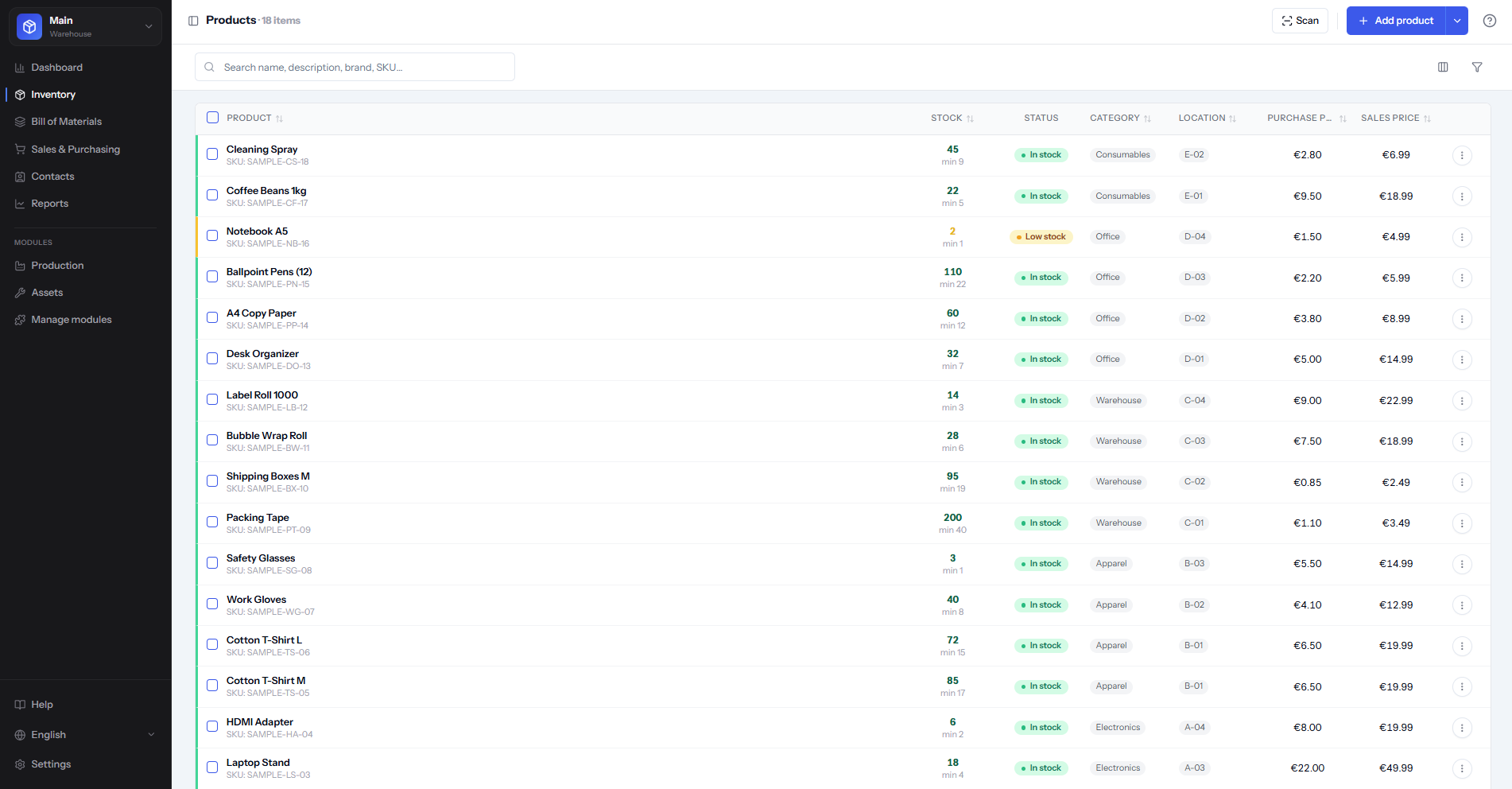
Real-Time Stock Tracking
A live, constantly updated view of every product across every location, so you always know what to reorder and what's overstocked,no guessing, no stale spreadsheets.
Order Management
Purchase orders and sales orders in one system. When stock moves, quantities update automatically,no manual re-entry between your storefront and your stockroom.
Barcode & QR Scanning
Turn any phone into a scanner. Receive shipments, pick orders, and run cycle counts in minutes instead of hours, with far fewer entry errors.
Integrations
Sync with Shopify, WooCommerce, QuickBooks, Xero, and major shipping carriers, so data flows automatically instead of being copied by hand between tools.
Demand Forecasting
Use sales history and seasonal trends to predict what you'll need and when, so you reorder before you run out instead of scrambling after a stockout.
Analytics & Reporting
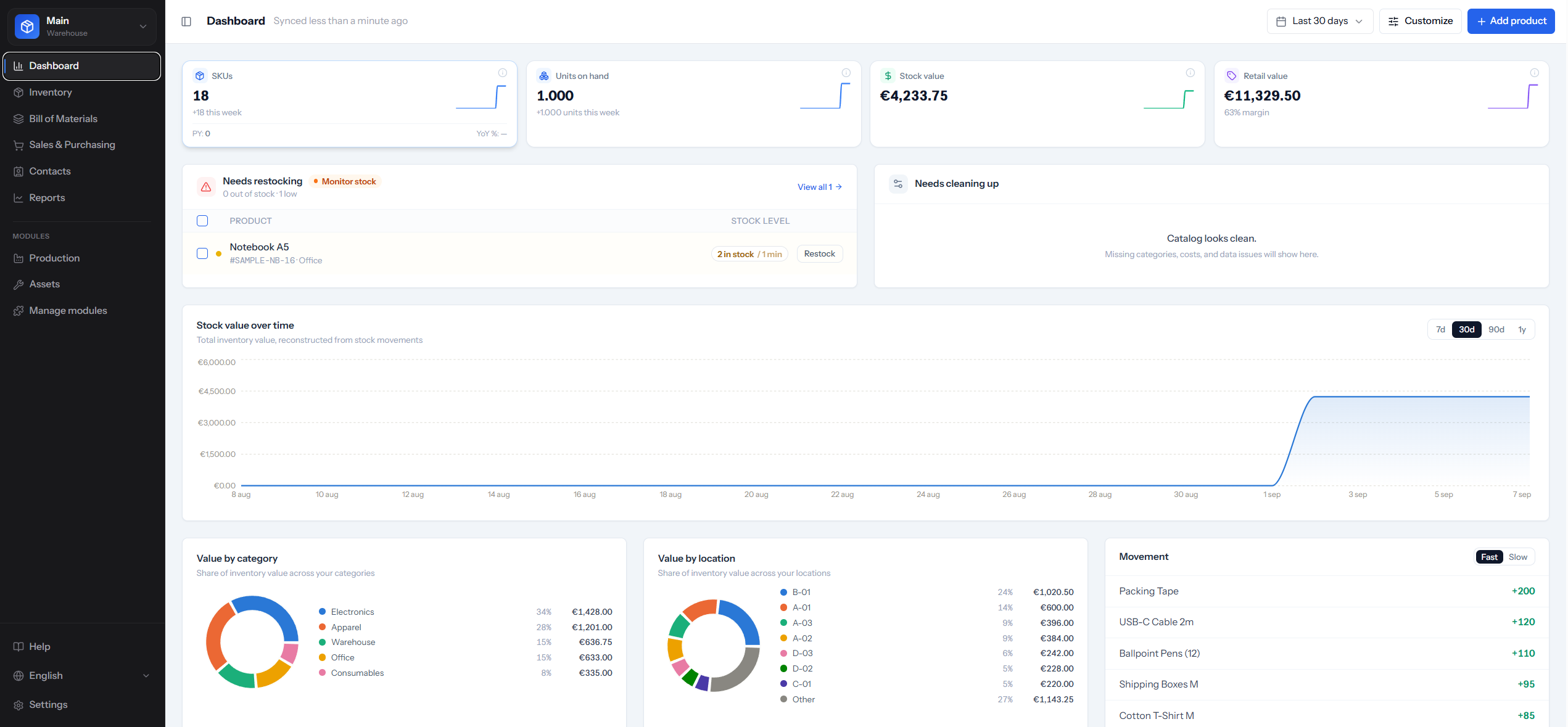
See your most profitable products, slow movers tying up cash, and shrinkage trends at a glance, in dashboards built for decisions, not just data.
Want the deeper mechanics behind reorder points and seasonal demand? See our free inventory software roundup (includes planning signals on free plans).
StockFlow vs. Zoho Inventory and Other Online Inventory Software
A quick look at how the leading online inventory management systems compare on the limits that matter most when you're starting out.
| Software | Free plan | Free order cap | Starting paid price | Barcode scanning | BOM support |
|---|---|---|---|---|---|
| StockFlow | 25 products | Unlimited | $9/mo | ||
| Zoho Inventory | Unlimited products | 50/mo | $29/mo | ||
| Sortly | 100 items | n/a | $49/mo | ||
| Odoo | Self-hosted only | n/a | $24.90/mo |
Pricing and limits as published by each vendor; see the full breakdown further down this page, our pricing page, or the dedicated best free inventory management software guide.
Inventory Management Software With Bill of Materials
Manufacturers and assemblers need inventory management software with bill of materials (BOM) to track both stock levels and product structures. A combined solution lets you define which components are needed for each product, see real-time material availability, and automate purchase orders when parts run low. StockFlow includes full BOM support,multi-level assemblies, version control, cost roll-up,integrated with your inventory. See our guide to inventory management software with bill of materials multi-level assemblies, version control, and cost roll-up on StockFlow's free plan.
Free Inventory Management Software
Looking for free inventory management software? StockFlow's Starter plan is free,no credit card required. You get up to 25 products, 2 users, and 1 warehouse, with no monthly order cap; barcode scanning, BOM management, and low-stock alerts are included at no cost. Paid plans start at $9/month once you need more room, sales orders, or multiple users. Start tracking your inventory in minutes. Compare free barcode inventory software or see our ranked best free inventory management software comparison.
Start FreeTop Inventory Management Software Solutions in 2026
The inventory management software market offers numerous options, each with different strengths and pricing models. We've analyzed the leading solutions to help you understand what's available and which might work best for your business needs.
StockFlow
Best OverallStockFlow stands out as the most accessible inventory management solution available for getting started. Unlike competitors that gate barcode scanning or BOM support behind a paywall, StockFlow's free Starter plan (25 products, 2 users, 1 warehouse, no monthly order cap) includes them from day one,and no credit card is required to start.
The platform includes everything growing businesses need: real-time inventory tracking, barcode and QR code scanning via mobile apps, order management for both purchases and sales, advanced analytics and reporting, and seamless integrations with popular business tools,available as you move up from the free Starter plan to Professional ($9/mo), Business ($29/mo), or Enterprise ($59/mo).
What makes StockFlow particularly valuable is its commitment to a free-forever Starter plan, not just a trial period, plus a usage-based upgrade path instead of a sudden paywall. This makes professional inventory management accessible to startups and small businesses that might otherwise struggle with the costs of traditional solutions.
Start Using StockFlow FreeZoho Inventory
Part of the wider Zoho suite, so it integrates well if you already use Zoho CRM or Books, and it covers multichannel selling and warehouse tracking. Its free plan caps out at 50 orders per month and one warehouse, and the interface can feel cluttered if you just need straightforward stock control.
Odoo
An open-source ERP with inventory as one of many modules,highly customizable for businesses with unique processes. The free, self-hosted version trades cost for complexity: most teams end up paying for hosting or consultants, making it overkill if you just need efficient stock management.
Sortly
A visual, photo-and-QR-code approach that's popular for tracking physical assets like tools and equipment rather than high-volume retail SKUs. It lacks demand forecasting and multi-location tracking, and its free plan is limited before paid tiers get pricey for multi-user teams.
Katana
Built specifically for manufacturers, with strong bill of materials and production planning baked into its inventory tracking. Valuable if you make products, but more complex and pricier than general inventory software if you're a retailer, wholesaler, or e-commerce seller.
Cin7
Aimed at omnichannel sellers, with strong integrations across e-commerce platforms, marketplaces, and accounting tools. The feature depth comes with a learning curve and pricing on the higher end of the market, which can be prohibitive for small businesses.
Lightspeed
Primarily a point-of-sale system with inventory built in, popular with brick-and-mortar retailers and hospitality businesses. Solid if you need POS functionality alongside stock tracking, but you'll pay for features you won't use if you're purely online or don't need a till.
Our Recommendation
While each solution has its strengths, StockFlow offers the best combination of features, usability, and value. The free-forever Starter plan removes financial barriers that prevent many businesses from implementing proper inventory management. Whether you're just starting out or scaling rapidly, StockFlow's usage-based pricing grows with you without the sudden jumps in cost that come with other solutions' tiered pricing models.
What Makes Inventory Management Software Effective?
Not all inventory management systems are created equal. The difference between a good solution and a great one often comes down to these key factors that impact daily operations and long-term success.
Ease of Use & User Adoption
The most feature-rich software is worthless if your team won't use it. Look for intuitive interfaces that don't require extensive training. Your staff should be able to perform common tasks,like receiving inventory or processing orders,within minutes of logging in, not after hours of training.
StockFlow prioritizes simplicity without sacrificing power. The clean interface and logical workflow mean new team members can start contributing immediately, reducing onboarding time and improving adoption across your organization.
Scalability & Growth Support
Your inventory needs will change as your business grows. Software that works perfectly for 100 SKUs and one location might buckle under 10,000 SKUs across multiple warehouses. Choose a system that can scale with your ambitions without requiring a complete platform migration later.
This is where many businesses get trapped by tiered pricing that forces a sudden, expensive jump when they outgrow a free plan. StockFlow's tiers scale gradually instead,Starter (free, 25 products), Professional ($9/mo, 2,000 items), Business ($29/mo, 5,000 items), and Enterprise ($59/mo, 10,000 items, unlimited warehouses),so growth never means a surprise bill or a platform migration.
Mobile Accessibility
Inventory management happens on warehouse floors, in retail stores, and at receiving docks,not just at office desks. Your team needs to scan barcodes, check stock levels, and process orders from anywhere on a phone, not just a desk terminal.
If your warehouse has genuinely unreliable Wi-Fi, ask specifically whether a tool offers an offline mode that queues scans locally and syncs once reconnected not every mobile-friendly tool does. StockFlow's mobile scanning is browser-based (a PWA) and requires a live connection today; it does not queue scans offline. See our dedicated free inventory software comparison for a closer look at mobile-specific features.
Accurate Data & Automation
Manual data entry is the enemy of accuracy. The best inventory systems automate data collection and updates through barcode scanning, integration syncing, and automated calculations. When inventory quantities update automatically from sales and purchases, you eliminate the human errors that plague manual systems.
Automation should extend to routine tasks like generating purchase orders when stock hits reorder points, sending low stock alerts, and updating financial records in your accounting software. Every automated task is one less opportunity for mistakes and one less burden on your team.
Reliable Customer Support
When your inventory system encounters issues, you need quick answers. Slow support response times can halt operations and cost you sales. Evaluate potential solutions based on their support reputation, available channels (email, chat, phone), and response time commitments.
Free solutions sometimes cut corners on support, but StockFlow maintains responsive customer service regardless of pricing tier. Good support shouldn't be a premium feature,it's essential infrastructure for any business-critical system.
Transparent Pricing & No Hidden Costs
Many inventory management platforms advertise attractive starting prices but hide costs behind per-user fees, transaction charges, integration add-ons, and feature restrictions. These hidden costs accumulate quickly, turning an affordable solution into an expensive one as you grow.
Read the fine print carefully. Some "free" plans cap you at 50 orders per month or a single warehouse, limits that might sound reasonable until you actually start using the system. StockFlow's free Starter plan caps products (100) and warehouses (1) but never caps monthly orders, and every paid tier's limits are published on our pricing page no hidden per-user fees or surprise charges.
Inventory Metrics That Matter
Track inventory turnover, days on hand, stockout rate, accuracy, and GMROI—practical metrics definitions and how to act on them. Good inventory management software surfaces these KPIs so you can move from spreadsheets to decisions.
Core metrics include turnover, days on hand, fill rate or stockout rate, inventory accuracy, and GMROI.
Metrics only help when tied to actions: cut dead stock, raise safety stock, or fix count processes.
Review a short dashboard weekly; deep-dive aging and category turns monthly.
Core inventory KPIs explained
Inventory turnover equals cost of goods sold divided by average inventory. Higher turns usually mean cash moves faster, though too-high turns can signal chronic stockouts. Days inventory outstanding (or days on hand) converts turns into an intuitive number of days stock would last at current usage.
Inventory accuracy is physical count versus system quantity, often expressed as a percentage of SKUs or value matched. Fill rate measures demand satisfied from stock; stockout rate tracks how often demand misses. GMROI (gross margin return on inventory) shows margin earned per dollar invested in stock—useful for retailers comparing categories.
Carrying cost percentage and obsolete inventory value complete a practical set. You do not need twenty KPIs; you need a handful the team understands and reviews on a cadence.
Turning numbers into decisions
If days on hand climb while sales are flat, pause reorders and run promotions on aging SKUs. If accuracy falls below your target (many aim for 95%+), increase cycle counts and investigate receiving errors before blaming theft. If stockouts cluster on A-items, raise reorder points or shorten supplier lead time rather than blanketing every SKU with more safety stock.
Segment metrics by location and category. A healthy company average can hide a disaster in one van or one product line. Multi-location software makes those cuts possible without manual pivot tables every Friday.
- •Weekly: stockouts, accuracy sample, open POs
- •Monthly: turns, days on hand, aging buckets
- •Quarterly: GMROI by category and supplier performance
Metric pitfalls to avoid
Do not optimize turnover alone if it destroys service levels. Do not celebrate high accuracy if counts exclude problem zones. Do not compare your turns to a dissimilar industry without context—grocery and furniture live on different planets.
Ensure COGS and inventory valuation methods are consistent when calculating turns. Mixing retail and cost figures produces nonsense. Document formulas in your SOP so new managers inherit the same dashboard logic.
Finally, pair leading indicators (incoming POs, forecast error) with lagging ones (turns, GMROI). Metrics describe health; process changes create it.
Related: inventory holding cost, inventory control 101, and SKU management guide.
The 4 Main Types of Inventory Management Systems
Understanding different approaches to inventory management helps you choose the right strategy and software for your specific business model. Here are the four fundamental types that businesses commonly implement.
1. Periodic Inventory Management
Periodic inventory systems involve counting stock at set intervals,weekly, monthly, or quarterly. Between counts, you rely on estimates based on recorded sales and purchases. This traditional approach requires minimal technology but provides limited visibility between counting periods.
Best for: Very small businesses with limited SKUs, businesses with low transaction volumes, or operations where precise real-time tracking isn't critical.
Limitations: You don't know your exact stock levels between counts, making it difficult to prevent stockouts or identify theft and shrinkage promptly. As businesses grow, periodic systems become increasingly inadequate.
2. Perpetual Inventory Management
Perpetual inventory systems update stock levels continuously as transactions occur. Every sale, purchase, return, or adjustment immediately reflects in your inventory records. This is the approach modern inventory management software uses, providing real-time accuracy.
Best for: Any business that values real-time accuracy, companies with multiple locations, e-commerce operations, and businesses that need to prevent stockouts or manage perishable goods.
Advantages: Perpetual systems dramatically reduce the need for physical counts (though periodic audits remain important for catching discrepancies). You always know what you have, where it is, and when to reorder. StockFlow operates as a perpetual inventory system, giving you constant visibility into your stock levels.
3. Just-In-Time (JIT) Inventory Management
Just-in-time inventory management minimizes stock holding by ordering products only when needed for production or sale. This approach reduces storage costs and tied-up capital but requires extremely reliable suppliers and accurate demand forecasting.
Best for: Manufacturers with predictable production schedules, businesses with expensive inventory carrying costs, companies with limited storage space, or operations with very reliable supplier relationships.
Risks: JIT systems are vulnerable to supply chain disruptions. A delay from suppliers can halt production or cause stockouts. Success requires sophisticated inventory management software that can track supplier performance and trigger orders with precision timing.
4. ABC Analysis Inventory Management
ABC analysis categorizes inventory into three tiers based on value and importance. 'A' items are high-value products requiring tight control and accurate tracking. 'B' items are moderate value with moderate control. 'C' items are low-value with simple controls. This approach focuses management attention where it matters most.
Best for: Businesses with large product catalogs, operations where a small percentage of SKUs generate most revenue, and companies looking to optimize inventory management effort and resources.
Application: Good inventory management software should support ABC analysis by automatically categorizing products based on sales data and allowing you to set different reorder rules for each category. Your most valuable products might warrant daily monitoring and quick reordering, while low-value items can be managed with simpler periodic review.
Most businesses benefit from combining approaches. You might use perpetual tracking as your foundation (which all modern software provides), implement ABC analysis to prioritize attention on valuable products, and use JIT principles for certain product categories while maintaining safety stock for others. StockFlow supports all these methodologies, giving you flexibility to adapt your strategy as your business evolves.
Can You Use Excel for Inventory Management?
This is one of the most common questions new business owners ask, and the honest answer is: yes, you can,but you probably shouldn't once your business reaches any significant scale.
When Excel Works for Inventory
Excel can be adequate for very small operations in specific situations: If you have fewer than 50 SKUs and sell through a single channel, process fewer than 20 orders per week, work alone or with just one other person, and operate from a single location with simple tracking needs, then a well-designed spreadsheet might suffice temporarily.
Excel's advantages are that it's familiar to most people, requires no learning curve if you already know spreadsheets, costs nothing extra if you already have Microsoft Office, and offers complete customization to match your exact workflow.
Where Excel Breaks Down
As your business grows, Excel's limitations become increasingly painful and costly:
No Real-Time Updates
Excel files don't automatically update when someone makes a sale or receives inventory. If multiple people access the file, you end up with version conflicts and overwritten data. One person's changes can wipe out another's work, leading to incorrect inventory counts.
Manual Data Entry Errors
Every number you type into a spreadsheet is an opportunity for mistakes. Transpose two digits, update the wrong row, or forget to save changes, and your inventory accuracy suffers. Studies show that 88% of spreadsheets contain at least one error, and in inventory management, those errors translate directly to stockouts or overstock situations.
No Multi-Location Support
Managing inventory across multiple warehouses or stores in Excel becomes extremely complex. You need separate sheets or files for each location, making it nearly impossible to get a consolidated view of total inventory or efficiently transfer stock between locations.
Limited Integration Capabilities
Excel doesn't connect to your e-commerce platform, accounting software, or shipping carriers. You're stuck manually copying data between systems,a time-consuming process that introduces errors and delays. When an order comes through Shopify, you need to manually update your Excel inventory, then manually update QuickBooks, then manually create a shipping label.
No Mobile Access
Warehouse staff can't easily scan barcodes and update Excel from their phones. They either need to write down counts on paper and enter them later (introducing delays and errors), or carry a laptop around the warehouse (impractical and slow).
Missing Advanced Features
Excel can't automatically calculate reorder points based on sales velocity, track batch numbers and expiration dates, generate purchase orders when stock is low, or provide the kind of sophisticated analytics that help you optimize inventory levels.
The Hidden Cost of Excel
The biggest problem with Excel isn't what it costs (financially, very little) but what it costs in time, errors, and missed opportunities. Consider:
- -Staff spending hours updating spreadsheets instead of serving customers or improving operations
- -Lost sales from stockouts that proper inventory software would have prevented
- -Excess inventory tying up cash because you couldn't track sales trends effectively
- -Customer complaints from overselling products you thought were in stock
Making the Switch from Excel
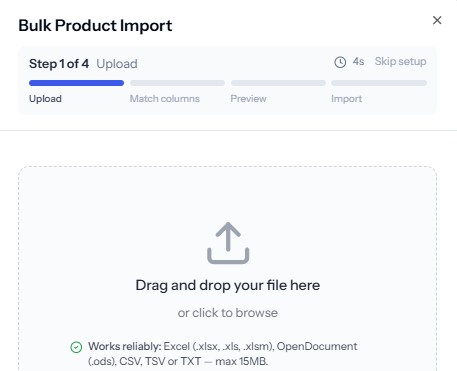
The transition from Excel to proper inventory management software is typically smoother than businesses expect. Most systems, including StockFlow, allow you to import your existing Excel data directly, so you don't lose any historical information or need to manually re-enter everything.
The immediate benefits are striking. Within the first week of switching to dedicated inventory management software, most businesses report significantly reduced time spent on inventory tasks, fewer errors and discrepancies in stock counts, better visibility into what's selling and what's not, and improved team coordination with everyone accessing the same real-time data.
Since StockFlow's Starter plan is free for catalogs up to 25 products, there's no financial reason to stick with Excel for most small businesses. You get professional-grade inventory management without the Excel headaches, and without paying anything until you actually outgrow the free tier.
The Truth About "Free" Inventory Management Software
When searching for inventory management solutions, you'll encounter many claiming to be "free." However, truly free and unlimited inventory software is remarkably rare. Understanding the difference between various "free" offerings helps you avoid frustration and hidden costs.
Free Trials vs. Free
Many companies advertise "free" inventory management, but they're actually offering time-limited trials, typically 14 days on StockFlow paid plans. After the trial ends, you must subscribe to a paid plan or lose access to your data. This isn't truly free; it's a marketing tactic to get you invested in the platform before presenting the bill.
Free trials serve a purpose for evaluating software, but they shouldn't be confused with genuinely free solutions. When a platform offers a trial, plan for the eventual cost and ensure it fits your budget before investing time in setup and training.
Freemium Plans with Severe Limitations
The most common "free" offering in inventory management is the freemium model,free access with crippling restrictions designed to push you toward paid plans. Common limitations include:
- -Product caps: Only 50-100 products allowed (frustratingly low for most real businesses)
- -Order limits: 20-50 orders per month (exceeded within days for active businesses)
- -Single user only: No team collaboration possible
- -One location: Can't manage multiple warehouses or stores
- -No integrations: Can't connect to e-commerce, accounting, or shipping tools
- -No barcode scanning: Must manually enter everything
- -Limited support: Community forums only, no direct help
These restrictions often sound reasonable until you actually start using the system. A 50-product limit might seem adequate for a small business, but if you sell products with multiple variants (colors, sizes), you hit the cap quickly. A 50-order monthly limit might work for a month, but as soon as you have a good sales week, you're locked out until the next billing cycle.
The "Free for Now" Bait-and-Switch
Some platforms start genuinely free but gradually introduce restrictions or transition to paid-only models once they've built a user base. Users invest months learning the system, importing data, and integrating processes, only to face unexpected charges or forced migrations when the company's business model changes.
This approach is particularly frustrating because the "free" promise gets quietly withdrawn, leaving users feeling trapped,switching to another platform means redoing all that setup work.
What Makes StockFlow Different
StockFlow's free Starter plan is a permanent, no-time-limit plan,not a trial that expires. It's a commitment to making professional inventory management accessible to small businesses, with a clear, published upgrade path instead of a sudden paywall.
“25 products free: No paywall on core features,barcode scanning and BOM included from day one
“Unlimited orders: No monthly order cap, even on the free plan
“Gradual scaling: Professional ($9/mo) takes you to 2,000 products and 5 users no big jump in price
“15 warehouses on Enterprise: $59/mo includes 15 locations; add more warehouses as needed
“Core features included free: Barcode scanning, BOM, and low-stock alerts aren't paywalled
“No credit card required: Start using immediately with zero commitment
StockFlow's pricing model lets us offer a genuinely usable free tier without the compromises other companies make. We believe financial constraints shouldn't prevent small businesses from implementing proper inventory management, and that growth should come with predictable, published pricing,see the full breakdown on our pricing page.
Start Using StockFlow Free - No Credit Card RequiredQuestions to Ask Before Choosing "Free" Software
When evaluating any inventory management solution claiming to be free, ask these critical questions:
- -Is this truly free, or just a trial period?
- -What specific limits apply (products, orders, users, locations)?
- -Which features are restricted in the free version?
- -Can I export my data if I need to switch platforms later?
- -What happens when my business grows beyond the free tier limits?
- -Are there transaction fees or other hidden costs?
- -Is customer support available to free users?
Getting Started with Inventory Management Software
Implementing inventory management software doesn't have to be overwhelming. With the right approach, you can be up and running quickly while setting yourself up for long-term success.
Step 1: Data Preparation
Before importing anything into your new system, clean up your existing inventory data. Create a spreadsheet with your products including SKU codes, product names and descriptions, current quantities on hand, reorder points and quantities, supplier information, and pricing details.
This preparation might reveal inconsistencies in your current tracking,duplicate SKUs, outdated products still in the system, or incorrect quantities. Fixing these issues now saves confusion later. If you're currently using Excel or another system, this is also your chance to verify physical counts match your records through a complete inventory audit.
Step 2: System Configuration
Once your data is ready, configure your inventory management software to match your business structure. Set up your warehouse and store locations, create user accounts for your team with appropriate permissions, configure your product categories and attributes, and establish your reorder rules and alerts.
StockFlow makes this configuration process straightforward with intuitive setup wizards and sensible defaults. You can import your prepared data in minutes and start operating immediately.
Step 3: Integration Setup
Connect your inventory management system to your other business tools. Link your e-commerce platform so orders automatically update inventory, connect your accounting software for seamless financial tracking, integrate shipping carriers for automated label generation, and sync your POS system if you have physical retail locations.
These integrations eliminate duplicate data entry and ensure information flows smoothly throughout your entire operation. Most modern systems, including StockFlow, offer pre-built integrations with popular platforms that can be activated with just a few clicks.
Step 4: Team Training
Even with user-friendly software, your team needs to understand how to use it effectively. Focus training on the specific tasks each team member performs: warehouse staff need to know how to receive inventory and pick orders, sales staff need to understand how to check stock levels and place orders, and managers need to learn reporting and analytics features.
Start with core functions and gradually introduce advanced features as people become comfortable. The simpler your chosen system, the faster your team will be productive,another reason StockFlow's intuitive design matters.
Step 5: Gradual Rollout
Consider starting with a pilot program rather than immediately switching your entire operation. Begin with one product category, one location, or one process (like receiving shipments), verify everything works correctly, and then gradually expand to other areas.
This approach reduces risk and allows you to learn from small issues before they become big problems. You can run your new system in parallel with your old one for a transition period if needed, though cloud-based solutions like StockFlow make full switching much less risky than traditional software implementations.
Ready to Transform Your Inventory Management?
StockFlow makes getting started effortless with no commitment required. Sign up for free, import your data, and start managing inventory more effectively within minutes. No credit card, no time limits, no hidden restrictions,just professional inventory management that grows with your business.
Get Started with StockFlow Free